
How to optimize website design? Master 2025
Why Website Design Optimization Is Your Digital Revenue Driver
How to optimize website design? Here’s the quick answer for busy business owners:
- Prioritize user experience – Design with your customers’ needs first
- Ensure mobile responsiveness – 59.5% of website visits come from mobile devices
- Optimize for speed – Sites loading in 1 second have 3x higher conversion rates
- Create clear navigation – Users should find what they need in 3 clicks or less
- Use strategic CTAs – Place compelling calls-to-action where users naturally look
- Test continuously – A/B test design elements to improve performance
Your website isn’t just a digital business card; it’s your most powerful conversion tool, working 24/7. Since 88% of people are less likely to return to a website after a bad first experience, optimization is critical for success. The stakes are high, but so are the rewards. Every dollar invested in UX can bring $100 in return—an ROI of 9,900%. Great design directly impacts your bottom line through higher engagement, better search rankings, and increased conversions.
Many businesses struggle with underperforming websites that fail to convert visitors. The good news is that website optimization follows proven principles that any business can implement.
I’m Guy Leon, founder and CEO of Guac Digital. We’ve helped clients achieve a 350% boost in engagement and conversion rates through strategic website optimization, and I know how to optimize website design for maximum business impact.
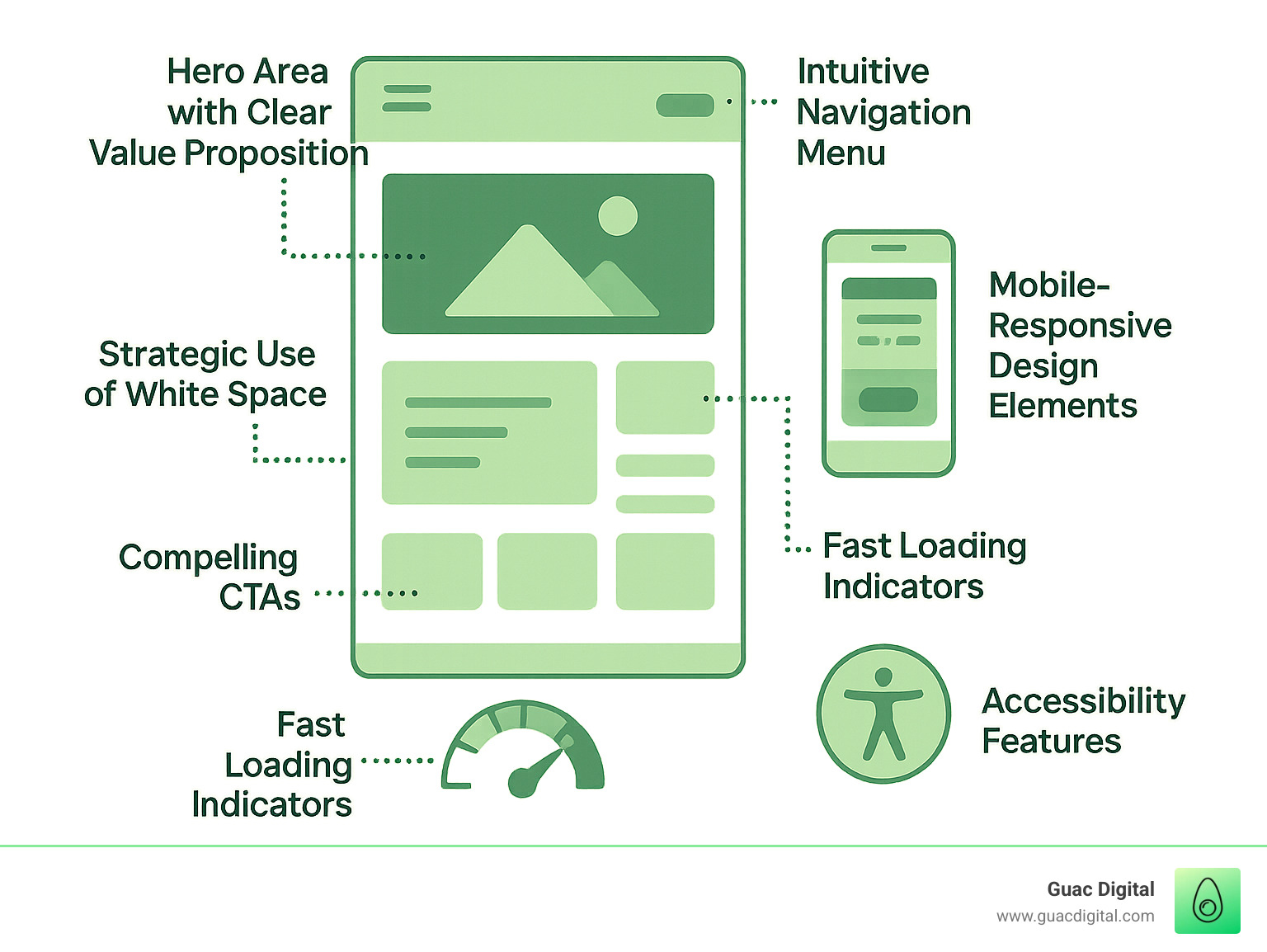
How to optimize website design? terms explained:
The Foundation: User-Centric and Intuitive Design
At Guac Digital, we believe understanding how to optimize website design begins with a fundamental principle: putting the user first. A website should feel like a helpful guide, not a confusing maze. This means designing with a deep understanding of your target audience’s needs, behaviors, and goals.
We start by developing detailed buyer personas to map out user journeys, anticipating what they want to find and do on your site. As Kristopher Tabaie wisely puts it, “Good web design is about more than just aesthetics… It involves a user-friendly layout, clear navigation, and a clean interface that clearly communicates the content.”
Design conventions are crucial. Users expect navigation at the top or left and logos that link to the homepage. Sticking to these conventions creates familiarity and reduces cognitive load. Visual hierarchy is another powerful tool for arranging elements so the most important information catches the eye first, guiding users through your content. Strategic use of white space (the empty areas around elements) improves readability and focus; in fact, it can increase user attention by 20%.
Finally, branding consistency across all pages—from colors and fonts to imagery and tone—builds trust and reinforces your brand identity, contributing to a professional, organized appearance.
Want to dive deeper into making your website truly shine for your users? Explore More info about our UI/UX Design services.
Designing for Your Target Audience
How do you design a website that truly caters to your target audience? It starts with user research and customer needs analysis. Pretend you’re a customer trying to accomplish a task on your website. What questions would you have? Understanding cultural design differences is also key, as a design favored in one culture might be overwhelming in another. There’s no one-size-fits-all approach. User feedback loops are invaluable. Asking someone unfamiliar with your business to steer your site can reveal pain points you might overlook. Continual feedback ensures your website evolves with your users’ needs.
Applying Essential Design Principles for Readability and Appeal
Visual hierarchy is about storytelling through design, arranging elements to guide the user’s eye naturally. Think about Spotify’s Premium offer page example—their headlines grab attention, leading to a clear call to action. Strategic use of white space is crucial for readability, creating breathing room that makes content easier to digest. Color theory and typography evoke emotions and influence readability. Choosing legible fonts (like Open Sans, at least 12-point) and limiting yourself to 2-3 font sizes helps maintain consistency. As one expert notes, “An easy-to-read website makes for a pleasant user experience.” Well-designed headings are paramount; they break up content, make it scannable, and help both users and search engines.
Crafting Compelling Content and Calls to Action (CTAs)
Your website’s content is its voice. High-quality content is useful, relevant, and provides value. It should be easy to read, with short paragraphs and bullet points for scannability. One.org’s use of icons as bullets is a great example of making information digestible. But great content needs persuasive Calls to Action (CTAs) to guide users toward conversion. CTAs should be visible, use action-oriented language (e.g., “Get a Quote”), and be strategically placed. WUFOO’s action-oriented page shows how a page can be designed entirely around prompting user engagement. Button design is critical; CTAs should stand out with contrasting colors. A/B testing different CTA texts, colors, and placements is an ongoing process that can yield significant conversion improvements.
How to Optimize Website Design for Performance, Mobile, and SEO
A beautiful website is only as good as its performance. This means blazing-fast speeds, a great look on any device, and being friendly to search engines. Google’s shift to mobile-first indexing means your mobile site is the primary version for ranking. This makes responsive design, where your site adapts to any screen size, non-negotiable. Page speed optimization and technical SEO are fundamental to attracting and retaining users and a crucial part of how to optimize website design.
Mastering Website Speed and Mobile Responsiveness
Users are impatient, and the impact of page load time is huge. A two-second loading delay can send users away, and an extra five seconds can increase your bounce rate by over 20%. Research shows a B2B site that loads in one second has a 3x higher conversion rate than a site that loads in five seconds. Nearly 70% of consumers admit that page speed impacts their willingness to buy from an online retailer.
How do we make your site fast? Image compression is a huge factor. We ensure photos look fantastic without weighing down your site. Caching, minifying code, and leveraging Content Delivery Networks (CDNs) also play vital roles in delivering content quickly.
With 59.5% of all website visits coming from phones, your mobile site is often the first impression. Google’s 2015 mobile-friendly update boosted sites that worked well on small screens. As Shane McEvoy wisely pointed out, “non-mobile ready websites are unlikely to rank well.” A mobile-first attitude is essential. Just look at The Sill’s mobile site example—it’s a perfect example of a seamless experience on any device.
Integrating SEO Best Practices into Your Web Design
How can web design elements be optimized to improve search engine visibility? This is where design and SEO become best friends. It starts with keyword research to understand what customers are searching for. We then weave those keywords into your content and site structure. An SEO-friendly URL structure is clean, memorable, and includes focus keywords (e.g., yourdomain.com/how-to-optimize-website-design).
Title tags and meta descriptions are your billboards on Google. The title tag, which 36% of SEO experts consider the most important SEO element, should be captivating and include keywords, around 60 characters. Your meta description, about 160 characters, gives a preview of your page.
Header tags (H1, H2, H3) organize content for readers and search engines. Image alt text is descriptive text for images that helps with accessibility and tells search engines what your pictures are about. Google uses over 200 factors to rank a website, so every detail counts. A smart internal linking strategy helps search engines crawl your site and guides users through your content.
Understanding Core Web Vitals and Technical SEO
Google uses Core Web Vitals to measure user experience, and these metrics impact your search rankings. They include:
- Largest Contentful Paint (LCP): Measures how fast the main content on your page loads.
- First Input Delay (FID): Checks how quickly your page responds to user interaction.
- Cumulative Layout Shift (CLS): Measures visual stability, preventing content from jumping around as the page loads.
As Tim Parker on Core Web Vitals notes, these metrics are vital for a smooth user experience. Ignoring them can hurt your search performance.
Beyond these vitals, technical SEO ensures search engines can read and understand your site. An XML Sitemap acts as a map for search engine bots. Indexability means your pages can be processed and included in Google’s index. This also involves correct robots.txt files, handling duplicate content, and ensuring a logical site structure. Even a beautiful site can have hidden technical glitches, which is why A complete Site Audit can identify technical issues that might be holding you back.
Enhancing Engagement Through Navigation and Accessibility
An intuitive and accessible website is essential for keeping visitors happy and ensuring they can find what they need. This involves clear information architecture, easy-to-use menus, and designing for everyone, including users with disabilities. At Guac Digital, we believe in making your site not just visible, but genuinely useful for all. Want to learn more about getting your site seen? Explore How to Increase Online Presence.
How to optimize website design with a clear navigation structure
How can effective navigation improve user experience? Think of your website’s navigation as a roadmap. If it’s confusing, visitors will leave. The goal is to make navigation so intuitive that users find what they need in three clicks or less.
Your main menu design should be clean and easy to spot, usually at the top or left. Categories should be logical with clear, descriptive names. For larger sites, mega menus help organize a lot of information without overwhelming the user. Your footer navigation is a key spot for important links like “About Us” and “Contact.” As digital expert Will Manuel says, “A clear, concise navigation menu helps users quickly locate their area of interest and follow it.”
We use user flow analysis to understand how people move through your site, allowing us to reduce the clicks needed to convert. Breadcrumbs (e.g., Home > Products > Category) are also fantastic navigational aids, showing users exactly where they are within your site’s structure.
Ensuring Your Website is Accessible and Inclusive for All Users
How can website design ensure accessibility for all users? This is about being a good digital citizen and meeting legal requirements. The importance of web accessibility is outlined in the Web Content Accessibility Guidelines (WCAG), which are international standards for making web content usable for people with disabilities.
For visually impaired users, screen reader compatibility is critical. This means using proper HTML so screen readers can interpret your content. Keyboard navigation is equally important for users who can’t use a mouse, ensuring all interactive elements are accessible. WCAG guidelines also include color contrast standards to make text readable for everyone. Tools like the WebAIM Contrast Checker tool help verify that color choices meet these standards. Finally, descriptive alt text for images is vital for screen readers, ensuring all users understand your visual content.
Nandita Gupta sums it up: “Accessibility doesn’t only benefit users—it also helps website owners, who get more traffic, more views, as well as higher adoption and engagement.” Many accessibility best practices simply make your website better for everyone. When you optimize website design for accessibility, you’re optimizing it for success.
The Growth Engine: Testing, Analytics, and Continuous Improvement
Optimizing a website isn’t a one-time task; it’s an ongoing journey of improvement. The digital world changes fast, and to stay ahead, we constantly monitor, test, and tweak our designs. This ensures every change is based on real data, helping your business grow.

In this section, we’ll dive into the strategies and tools key to this process. For more ways to turn visitors into loyal customers, check out How to optimize website for conversions.
Leveraging Tools for Monitoring and Testing
What tools are crucial for ongoing monitoring and improvement of website design? Data is your website’s secret superpower, telling you exactly what’s working and what’s not.
Google Analytics provides insights into visitor numbers, session duration, bounce rates, and user flow. This helps us understand what visitors are doing. To understand the why, we use other tools. Heatmaps, like those from Guac Digital’s Heat Map Checker tool, visually show where users click, move, and scroll. This feedback helps spot areas that grab attention or cause confusion. Session recording lets us anonymously watch user visits to see where they get stuck or frustrated.
A/B testing tools are essential for making data-driven design choices. We can test different versions of a page element—like a CTA phrase or button color—to see which performs better. This systematic approach ensures improvements are effective. Finally, user surveys and feedback widgets allow us to gather invaluable opinions directly from your visitors.
Common (and Costly) Website Design Mistakes to Avoid
Knowing what traps to avoid is as important as implementing best practices. What are the typical mistakes to avoid when optimizing website design? Here are some common, costly errors:
- Slow load times: Visitors will leave a slow site, costing you potential customers.
- Non-responsive design: With so many users on phones, your site must look great on every device.
- Cluttered layouts: Too much information or a maze of links creates confusion. Simplicity and focus are key.
- Confusing navigation: If users can’t find what they’re looking for, they’ll get frustrated and leave.
- Weak or hidden CTAs: Your calls to action should be clear, prominent, and compelling.
- Poor readability: Tiny fonts, clashing colors, or long blocks of text cause disengagement.
- Inconsistent branding: A site that looks different from page to page can seem unprofessional and untrustworthy.
- Broken links (404 errors): These are digital dead ends that hurt user experience and SEO.
- Ignoring accessibility: Failing to design for all users means missing a large audience and risking legal issues.
Frequently Asked Questions about Website Design Optimization
You’ve learned a lot about how to optimize website design. Now, let’s tackle some of the most common questions with clear, actionable insights.
What is the difference between UX design and web design?
While they work together, they are distinct. Web design focuses on the visual aesthetics—the look of your site, including colors, fonts, and layout. It’s about making the site visually appealing.
UX (User Experience) design is about the overall experience—the feel and functionality. A UX designer ensures the site is intuitive, efficient, and enjoyable to use. This involves usability, information architecture, and user flows. A stunning website with poor UX will frustrate visitors. For optimal results, both disciplines must work together.
How often should a website be redesigned or optimized?
There’s a key difference between redesign and optimization. A full redesign is a major overhaul typically needed every 3 to 5 years, or when your business model or technology changes significantly.
Optimization, however, should be a continuous, ongoing process. The digital world is always evolving, as are user behaviors and your business. Regular analytics review, A/B testing, content updates, and technical checks are part of this constant fine-tuning. This is how you continuously learn how to optimize website design for peak performance.
What is the most important factor in website design optimization?
If we had to pick one factor, it would be user-centricity. This means every design decision—from layout to button text—is made with your target audience’s needs, goals, and behaviors in mind.
A website that is easy to use and provides real value will naturally perform better. A positive user experience impacts everything from how long visitors stay to whether they convert. Google’s algorithms increasingly reward sites that delight users. All other factors, like speed, mobile responsiveness, and SEO, ultimately serve to improve this core user experience.
Conclusion
Your journey to understanding how to optimize website design evolves with every visitor. We’ve walked through the essential building blocks, from user-centric design to the technical elements that ensure performance.
Think of website optimization as building a house: user-centricity is the foundation, technical performance is the framework, SEO is the wiring, accessibility is the welcome mat, and continuous improvement is the ongoing maintenance. Each part is essential for a structure that stands strong and serves its purpose.
- User-centricity puts you ahead of the competition.
- Technical performance is the price of admission in the digital marketplace.
- SEO integration creates an experience loved by users and search engines.
- Accessibility makes your site better for everyone and expands your audience.
- Continuous improvement through testing and monitoring keeps your site at its best.
At Guac Digital here in Tampa, we’ve seen how these principles transform businesses. We specialize in leveraging big data for programmatic marketing and creating personalized strategies that deliver real ROI. Your website isn’t just a digital brochure—it’s your most valuable sales tool, working around the clock.
The beauty of website optimization is its measurable impact. When done right, you’ll see the results in your analytics, conversion rates, and bottom line. Every element works together to create an experience that not only looks professional but actually drives business growth.
Ready to put these strategies to work for your business? Transform your online presence with our expert engine optimization services. Let’s turn your website into the growth engine your business deserves.