
Best Website for Hosting: Complete 2026 Guide to Choosing the Right Provider
Quick Answer
The best website for hosting in 2026 is Hostinger for overall value and beginners, A2 Hosting for WordPress-specific needs with automated backups, and SiteGround for premium performance with a 4.9 Trustpilot rating. Your ideal choice depends on your budget, technical expertise, and whether you need specialized features like WordPress optimization or cloud scalability.
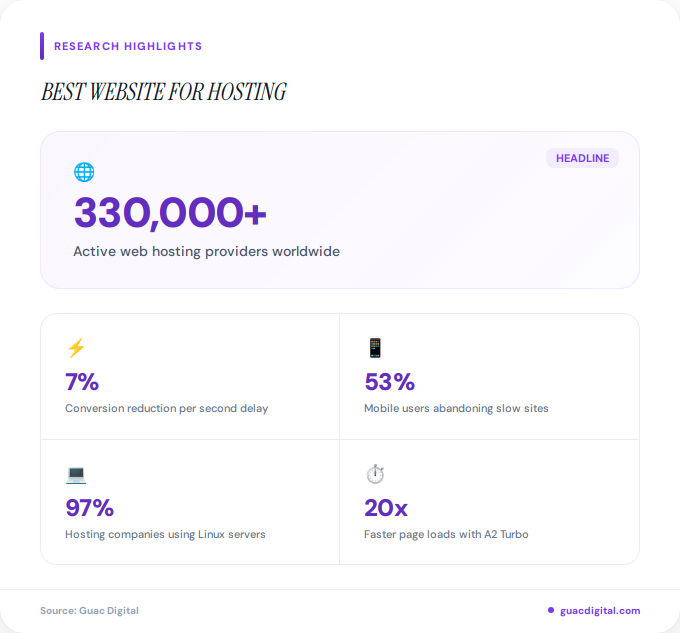
Choosing the best website for hosting can feel overwhelming with over 330,000 active web hosting providers worldwide as of 2026. 97% of hosting companies use Linux-based servers, but the similarities end there. Your website’s speed, security, and overall success depend heavily on this single decision.
Whether you’re launching your first blog, building an e-commerce empire, or migrating an established business site, the hosting provider you select impacts everything from page load times to search engine rankings. With hosting prices ranging from $2 to $500+ per month depending on your specific needs, understanding the landscape is crucial.
This comprehensive guide examines the top-performing hosting providers in 2026, backed by real performance data, customer satisfaction ratings, and expert testing. You’ll discover which platforms excel for specific use cases and how to match your unique requirements with the right hosting solution.
What Is Web Hosting and Why Does It Matter?
Web hosting is the service that makes your website accessible on the internet by storing your files on powerful computers called servers. When someone types your domain name into their browser, these servers deliver your website’s content to their device within milliseconds.
The quality of your hosting directly affects your site’s conversion rate and user experience. According to recent web hosting statistics, a one-second delay in page load time can reduce conversions by 7%. 53% of mobile users abandon sites that take longer than three seconds to load.
Beyond speed, your hosting provider manages critical infrastructure including security updates, backup systems, bandwidth allocation, and server maintenance. Poor hosting leads to frequent downtime, slow page speeds, and vulnerability to cyber attacks, all of which damage your brand reputation and search engine rankings.
What Are the Top Hosting Providers in 2026?
Based on comprehensive testing, customer reviews, and performance metrics, several providers have emerged as industry leaders. Each excels in specific categories, making them the best website for hosting depending on your priorities.
Hostinger: Best Overall Value
Hostinger dominates the budget-friendly segment while maintaining premium features. With hosting plans starting at affordable rates and offering 99.9% uptime guarantees, it’s consistently ranked #1 for beginners and cost-conscious users. The platform includes a free domain, SSL certificate, and an intuitive custom control panel that simplifies site management.
Hostinger’s global data center network ensures fast load times regardless of visitor location. Their AI-powered website builder helps users create professional sites without coding knowledge, making it ideal for first-time site owners.
A2 Hosting: WordPress Excellence
A2 Hosting earns its 4.6 Trustpilot rating through exceptional WordPress optimization. The platform offers SwiftServer technology with Turbo options that deliver up to 20x faster page loads compared to standard shared hosting. Automated backups, WordPress-specific security patches, and staging environments make it the preferred choice for WordPress developers.
Their managed WordPress hosting includes free site migration, pre-installed optimization plugins, and specialized support staff trained specifically in WordPress troubleshooting. This focus makes A2 Hosting particularly valuable for content-heavy sites and WooCommerce stores.
SiteGround: Premium Performance
With a 4.9 Trustpilot rating, SiteGround represents the gold standard in customer satisfaction and technical excellence. Their proprietary speed technology, including NGINX-based caching and PHP 8.1+ support, consistently delivers sub-second page load times in independent tests.
SiteGround’s support team responds within minutes through 24/7 live chat, phone, and ticketing systems. Their infrastructure includes Google Cloud Platform integration, automated daily backups, and free CDN, justifying their premium pricing for businesses where performance is non-negotiable.
Bluehost: WordPress Official Partner
Bluehost maintains its status as WordPress.org’s officially recommended hosting provider. With over 2 million websites hosted, it combines ease of use with WordPress-specific features. Their platform includes one-click WordPress installation, automatic updates, and WooCommerce integration for e-commerce sites.
Current promotions offer significant discounts, making Bluehost accessible for new site owners while providing scalability as your traffic grows. The seamless WordPress integration means less technical configuration and faster time to launch.
| Provider | Best For | Trustpilot Rating |
|---|---|---|
| Hostinger | Overall Value & Beginners | 4.6 |
| A2 Hosting | WordPress Performance | 4.6 |
| SiteGround | Premium Support | 4.9 |
Additional Notable Providers
ScalaHosting excels in cloud hosting with proprietary SPanel control panel technology and robust security features. Their managed VPS solutions offer dedicated resources at competitive prices, ideal for growing businesses that have outgrown shared hosting.
MochaHost leads in dedicated server hosting with a 4.8 Trustpilot rating and industry-leading 180-day money-back guarantee. Their commitment to customer satisfaction and flexible refund policies reduce risk for businesses making significant hosting investments.
DreamHost prioritizes privacy with unlimited bandwidth plans and no tracking policies. Their open-source commitment and transparent pricing appeal to developers and privacy-conscious organizations.

What Types of Hosting Are Available?
Understanding hosting categories helps you select the best website for hosting based on your technical requirements and growth trajectory. Each type offers distinct advantages and limitations that align with different business stages.
Shared Hosting
Shared hosting places multiple websites on a single server, sharing resources like CPU, RAM, and storage. This makes it the most affordable option, typically ranging from $3 to $15 per month. It’s perfect for personal blogs, portfolio sites, and small business websites with moderate traffic.
The trade-off involves potential performance limitations during traffic spikes when neighboring sites consume server resources. However, modern shared hosting from quality providers includes resource protection to prevent one site from monopolizing server capacity.
Virtual Private Server (VPS) Hosting
VPS hosting creates isolated virtual environments on physical servers, giving you dedicated resources and root access. Pricing typically ranges from $20 to $100+ per month depending on allocated resources and management level.
This option suits growing websites exceeding shared hosting limitations but not yet requiring full dedicated servers. VPS hosting offers scalability, allowing you to adjust resources as traffic patterns change without migrating to new servers.
Dedicated Server Hosting
Dedicated hosting provides an entire physical server exclusively for your website. With complete control over server configuration, security settings, and software installations, it’s the most powerful option for high-traffic enterprises and applications requiring maximum performance.
Costs range from $80 to $500+ monthly, with managed services commanding premium pricing. The investment makes sense for websites handling millions of monthly visitors or running resource-intensive applications like video streaming or large databases.
Cloud Hosting
Cloud hosting distributes your website across multiple connected servers, ensuring redundancy and near-perfect uptime. According to industry testing of web hosting services, cloud platforms consistently achieve 99.99% uptime rates by automatically shifting traffic when individual servers experience issues.
Pricing varies widely based on resource consumption, from $10 to $200+ monthly. The pay-as-you-go model makes cloud hosting cost-effective for websites with fluctuating traffic patterns, as you only pay for resources actually used.
Managed WordPress Hosting
Specialized WordPress hosting optimizes server configurations specifically for WordPress sites. Providers handle updates, security patches, caching, and WordPress-specific optimizations automatically, freeing you to focus on content creation rather than server management.
Premium managed WordPress hosting from providers like Guac Digital’s recommended partners includes advanced features like staging environments, automatic backups, and expert WordPress support. Pricing reflects these specialized services, typically ranging from $15 to $150+ monthly.
How Do You Choose the Right Hosting Provider?
Selecting the best website for hosting requires evaluating multiple factors beyond price. Your decision should align with both current needs and anticipated growth over the next 12 to 24 months.
Assess Your Technical Expertise
Beginners benefit from managed hosting solutions with intuitive control panels and responsive support teams. If you’re comfortable with server administration, unmanaged VPS or dedicated hosting offers greater flexibility and cost savings.
Consider whether you need one-click installers for content management systems, or if you prefer manual configuration. The learning curve varies significantly between providers, with some prioritizing simplicity while others target advanced users.
Evaluate Your Traffic Expectations
Accurate traffic projections prevent overpaying for unused resources or experiencing crashes from insufficient capacity. Start conservatively with shared hosting if you’re launching a new site, then upgrade as your audience grows.
According to web hosting statistics analysis, most small business websites operate comfortably on shared hosting until reaching 25,000 to 50,000 monthly visitors. Beyond that threshold, VPS or cloud solutions become necessary to maintain performance.
Consider Your Website Type
E-commerce sites require robust security features, SSL certificates, and PCI compliance for payment processing. Media-heavy portfolios need generous bandwidth and storage allocations. Membership sites benefit from dedicated IP addresses and advanced caching.
Match your hosting plan to your specific use case. WordPress bloggers should prioritize WordPress-optimized hosting, while developers building custom applications need flexibility in programming language support and database options.
Review Support Quality
When technical issues arise, support responsiveness determines whether you experience minutes or hours of downtime. Test support channels before committing by asking pre-sales questions through live chat, email, and phone.
Look for providers offering 24/7 support through multiple channels. Premium hosts often provide priority support queues, dedicated account managers, and proactive monitoring that identifies potential issues before they impact your site.
The best hosting provider isn’t always the cheapest or most feature-rich. It’s the one that aligns with your technical abilities, budget constraints, and growth trajectory while providing reliable support when you need it most. Your hosting choice becomes the foundation upon which your entire online presence is built.
What Performance Factors Should You Consider?
Website performance directly impacts user experience, search engine rankings, and ultimately your bottom line. The best website for hosting excels across multiple technical metrics that determine how visitors experience your site.
Uptime Reliability
Uptime measures the percentage of time your website remains accessible. While most providers advertise 99.9% uptime, this translates to approximately 8.7 hours of potential downtime annually. Premium providers guarantee 99.99% or higher, reducing annual downtime to under 53 minutes.
Review Service Level Agreements (SLAs) carefully. Some providers offer compensation credits when uptime falls below guaranteed thresholds, demonstrating confidence in their infrastructure reliability. Independent monitoring tools can verify advertised uptime claims before you commit.
Page Load Speed
Server response time forms just one component of overall page speed, but it’s fundamental. Quality hosting ensures Time to First Byte (TTFB) under 200 milliseconds, while budget providers may exceed 600 milliseconds or more during peak usage periods.
Location matters significantly for speed. Select providers with data centers near your primary audience or global CDN integration that caches content worldwide. The physical distance between servers and visitors directly impacts latency and perceived site speed.
Scalability Options
Your hosting should grow seamlessly with your success. Look for providers offering easy upgrade paths from shared to VPS to dedicated hosting without requiring site migrations or experiencing downtime during transitions.
Cloud hosting provides the most flexible scalability, allowing instant resource allocation adjustments. This elasticity proves particularly valuable for seasonal businesses experiencing traffic spikes or websites with viral content potential.
Server Technology and Resources
Modern hosting leverages technologies like SSD storage, HTTP/3 protocol support, and latest PHP versions. These technical specifications directly impact performance but often get overlooked by non-technical buyers focusing primarily on storage space and bandwidth.
Solid-state drives (SSDs) deliver 20x faster data access compared to traditional hard drives, significantly reducing database query times and page generation speeds. Ensure your hosting plan includes SSD storage rather than older HDD technology.
How Much Does Web Hosting Cost?
Web hosting pricing varies dramatically based on hosting type, resources allocated, management level, and provider positioning. Understanding cost structures helps you budget appropriately and identify value versus inflated pricing.
Shared Hosting Costs
Entry-level shared hosting plans start at $3 to $30 per month, with introductory promotional rates often available for first-year commitments. Premium shared hosting with enhanced resources and support ranges from $15 to $50 monthly.
Watch for renewal pricing that significantly exceeds promotional rates. Some providers offer 70% to 90% discounts initially, then charge full price upon renewal. Calculate total cost of ownership over two to three years rather than focusing solely on first-year expenses.
VPS and Cloud Hosting Investment
Virtual private servers typically cost $20 to $150+ per month depending on allocated CPU cores, RAM, storage capacity, and whether you select managed or unmanaged services. Managed VPS includes server administration, security updates, and technical support, justifying higher monthly fees.
Cloud hosting pricing models charge based on actual resource consumption rather than fixed monthly fees. Budget $30 to $300+ monthly for professional cloud hosting, with costs scaling proportionally to traffic volume and computing requirements. This flexibility prevents overpaying during slow periods while ensuring adequate resources during traffic surges.
Dedicated Server and Enterprise Hosting
Full dedicated servers command premium pricing from $100 to $500+ monthly for standard configurations. High-performance servers with the latest processors, substantial RAM allocations, and managed services can exceed $1,000 monthly for enterprise deployments.
Enterprise hosting includes advanced features like load balancing, redundant systems, dedicated account management, and guaranteed Service Level Agreements with financial penalties for downtime. These investments make sense for businesses where every minute of downtime translates to significant revenue loss.
Hidden Costs to Consider
Base hosting fees rarely represent total ownership costs. Factor in domain registration fees ($10 to $20 annually), SSL certificates if not included, premium backup solutions, email hosting, and professional migration services when switching providers.
Some hosts charge for essential features like automated backups, staging environments, or CDN integration that others include standard. Compare total package value rather than headline pricing alone. A slightly more expensive host offering comprehensive features often proves more economical than a cheap provider requiring multiple paid add-ons.
Which Hosting Is Best for WordPress?
WordPress powers approximately 43% of all websites globally, making WordPress-optimized hosting a critical category. The best website for hosting WordPress sites balances performance, security, and ease of use with WordPress-specific requirements.
Why WordPress Needs Specialized Hosting
WordPress sites require specific PHP versions, MySQL databases, and server configurations for optimal performance. Generic hosting often runs outdated software versions or lacks WordPress-specific optimizations like object caching and PHP opcode caching.
Managed WordPress hosting providers tune every aspect of their infrastructure specifically for WordPress, resulting in 2x to 5x faster load times compared to standard shared hosting running WordPress. This performance advantage directly impacts search rankings and user engagement metrics, similar to how conversion optimization strategies improve business outcomes.
Top WordPress Hosting Recommendations
A2 Hosting dominates WordPress-specific hosting with pre-configured optimization plugins, automatic core updates, and specialized WordPress support staff. Their Turbo servers utilize LiteSpeed web server technology and advanced caching specifically tuned for WordPress database queries.
Bluehost’s official WordPress partnership ensures seamless integration and one-click installation. Their platform includes automatic WordPress updates, integrated CDN, and WooCommerce optimization for online stores. The partnership provides early access to WordPress beta features and guaranteed compatibility.
SiteGround’s SuperCacher technology implements three caching layers specifically designed for WordPress: static cache, dynamic cache, and Memcached for database queries. Combined with their Git integration and staging environments, it’s ideal for WordPress developers managing multiple client sites.
Essential WordPress Hosting Features
Quality WordPress hosting must include automated daily backups with easy restoration, as WordPress sites face constant security threats from outdated plugins and themes. Look for hosts offering free SSL certificates, malware scanning, and WordPress-specific firewall rules.
Staging environments allow you to test theme changes, plugin updates, and content modifications without risking your live site. This feature, once reserved for enterprise hosting, now appears in mid-tier WordPress plans and prevents costly mistakes from affecting visitor experience.
One-click staging, automatic plugin updates with rollback capabilities, and WP-CLI access for advanced users separate premium WordPress hosting from basic shared plans. These features save hours of technical work and reduce the risk of site-breaking errors during maintenance.
What Security Features Should Your Host Provide?
Website security extends beyond strong passwords and updated software. Your hosting provider serves as the first line of defense against cyber attacks, data breaches, and malicious activities targeting your site.
SSL Certificates and Encryption
Free SSL certificates should be standard with every hosting plan in 2026. Secure Socket Layer (SSL) encryption protects data transmitted between your server and visitors’ browsers, essential for e-commerce sites handling payment information and required for optimal search engine rankings.
Google Chrome marks non-HTTPS sites as “Not Secure,” damaging credibility and deterring visitors. Beyond free certificates, premium hosting offers Extended Validation (EV) SSL certificates displaying your organization name in the address bar, building additional trust for high-value transactions.
Firewall and DDoS Protection
Web Application Firewalls (WAF) filter malicious traffic before it reaches your site, blocking SQL injection attacks, cross-site scripting, and other common exploits. Quality hosts implement multiple firewall layers at both network and application levels.
Distributed Denial of Service (DDoS) attacks overwhelm servers with fake traffic, causing legitimate visitors to experience timeouts or complete outages. Enterprise hosting includes DDoS mitigation that absorbs attack traffic before it impacts your site, crucial for businesses dependent on continuous online availability.
Malware Scanning and Removal
Automated malware scanning detects compromised files, backdoors, and suspicious code injected by attackers. Premium hosting providers scan daily and immediately quarantine infected files while notifying you of security issues requiring attention.
Some hosts include malware removal services at no additional cost, cleaning hacked sites and restoring them to secure states. This service alone can save hundreds to thousands of dollars compared to hiring external security consultants for remediation.
Backup and Disaster Recovery
Regular automated backups ensure you can restore your site after security breaches, server failures, or accidental data deletion. Minimum acceptable backup frequency is daily, with premium hosts offering hourly backups for mission-critical sites.
Equally important as backup frequency is restoration simplicity. One-click restoration features allow non-technical users to roll back their sites within minutes rather than hours or days required with complex manual processes. Test restoration procedures during low-traffic periods to ensure backups actually work when needed.
Key Takeaways
- Hostinger offers the best overall value for beginners and budget-conscious users, combining affordable pricing with essential features and 99.9% uptime guarantees.
- A2 Hosting leads WordPress-specific hosting with SwiftServer technology, automated backups, and specialized WordPress support earning a 4.6 Trustpilot rating.
- SiteGround delivers premium performance with a 4.9 Trustpilot rating, Google Cloud Platform integration, and sub-second load times justifying higher pricing for performance-critical sites.
- Hosting type selection depends on traffic volume and technical expertise, with shared hosting suitable for new sites, VPS for growing businesses, and dedicated servers for high-traffic enterprises.
- Security features including SSL certificates, malware scanning, and automated backups should be standard, not premium add-ons, protecting your site and visitor data.
- Real-world performance metrics matter more than advertised specifications, with uptime, page load speed, and support responsiveness directly impacting user experience and search rankings.
- Total cost of ownership over multiple years provides better value assessment than introductory promotional pricing that increases significantly upon renewal.
People Also Ask
What is the most reliable web hosting service?
SiteGround consistently ranks as the most reliable web hosting service with a 4.9 Trustpilot rating and 99.99% uptime guarantees. Their infrastructure includes redundant systems, Google Cloud Platform integration, and proactive monitoring that identifies issues before they cause downtime.
Is shared hosting good enough for a small business?
Shared hosting works well for small businesses with under 25,000 monthly visitors and simple website requirements. Quality shared hosting from providers like Hostinger includes sufficient resources for business sites, email hosting, and basic e-commerce, making it cost-effective for startups and local businesses.
How much does professional web hosting cost per month?
Professional web hosting costs range from $10 to $300+ per month depending on hosting type, resources, and management level. Shared hosting starts at $3 to $30 monthly, VPS hosting ranges from $20 to $150, and dedicated servers cost $100 to $500+ for enterprise-grade infrastructure.
Can I switch web hosting providers later?
Yes, you can switch web hosting providers at any time, though the process requires technical steps including backing up files, transferring databases, and updating DNS settings. Many premium hosts offer free migration services that handle the technical work, minimizing downtime during transitions. Similar to working with professional agencies, expert migration support ensures smooth transitions.
What happens if my website gets too much traffic for my hosting plan?
Exceeding your hosting plan’s resource limits typically results in slow page loads, temporary suspensions, or overage charges depending on your provider’s policies. Quality hosts monitor resource usage and notify you before problems occur, allowing proactive upgrades. Cloud hosting automatically scales resources during traffic spikes, preventing downtime.
Do I need managed hosting or can I handle it myself?
Choose managed hosting if you lack server administration experience or prefer focusing on content rather than technical maintenance. Managed hosting providers handle security updates, software installations, and performance optimization automatically, while unmanaged hosting requires you to perform these tasks yourself but costs less monthly.
Frequently Asked Questions
What is the difference between web hosting and domain registration?+
Web hosting stores your website files on servers that deliver content to visitors, while domain registration secures your website address (like example.com) that people type into browsers. You need both services for a functional website, though many hosting providers bundle domain registration with hosting packages for convenience.
How long does it take to set up web hosting?+
Most web hosting activates instantly or within 24 hours after purchase. Setting up your actual website depends on complexity, with simple sites using website builders launching within hours, while custom WordPress sites with imported content may require several days for complete configuration and testing.
Can I host multiple websites on one hosting account?+
Many hosting plans support multiple websites on a single account, particularly unlimited shared hosting and VPS plans. Entry-level plans may restrict you to one domain, while mid-tier and premium plans typically allow unlimited domains with individual email accounts and separate file management for each site.
What uptime percentage should I expect from quality hosting?+
Quality hosting providers guarantee 99.9% uptime minimum, translating to approximately 8.7 hours of potential downtime annually. Premium providers achieve 99.99% or higher, reducing annual downtime to under one hour. Review Service Level Agreements (SLAs) that specify compensation when uptime falls below guaranteed thresholds.
Does web hosting affect SEO rankings?+
Web hosting significantly impacts SEO through page load speed, uptime reliability, and server location relative to your audience. Google uses site speed as a ranking factor, with faster-loading sites ranking higher in search results. Frequent downtime also damages rankings, making quality hosting essential for SEO success alongside other optimization strategies like those provided by professional SEO agencies.
What is bandwidth and how much do I need?+
Bandwidth measures data transferred between your server and visitors, typically calculated monthly. A website receiving 10,000 visitors monthly with 3MB average page size requires approximately 30GB bandwidth. Most modern hosting plans include unlimited or very generous bandwidth allocations, making this less of a concern than it was historically.
Should I choose Linux or Windows hosting?+
Choose Linux hosting for WordPress, PHP-based sites, and most general web applications, as 97% of hosting companies use Linux for its stability and open-source advantages. Select Windows hosting only if your site requires specific Microsoft technologies like ASP.NET or MSSQL databases. Linux hosting typically costs less and offers broader software compatibility.